How Companies Are Using AI in 2026 to Improve UX in Real Products


Summary
AI is transforming UX in 2026, but only when used strategically. This article explores how companies are integrating AI tools like Stitch, Figma AI, and Uizard into real products, why human oversight is non-negotiable, and how Netflix used the Llama 3.1 8B model to achieve a 3-5% improvement in user satisfaction through personalized artwork recommendations.
Yes, another article around AI tools and AI development. At the end of the day, we are more immersed than ever in the AI era. That being said, it is important to expand our minds with this topic and ask important questions about the processes. The impact of AI in software development as a whole is clear; today we are focusing on how it’s improving UX in real products. And actually improving, not just providing speed, which is a great asset but also a tricky advantage that can also get you faster to technical debt.
Where Everything Should Start With AI
Your expectations when working with AI tools should be clearly defined from the beginning, even more so with UX development, which is one of the less developed areas of AI in the market overall. But that’s only because founders mistakenly use these tools for more than a prototyping layer and defining potential users. Some founders treat these low-tier products as final versions, which eventually backfires. Most UX products developed by AI miss performance issues and have business logic gaps, accessibility failures, and overall brand inconsistency. If you are a non-technical founder, you will most likely miss these issues; that's why AI-generated UX should always be reviewed by an expert.
If the performance of your product is not 100% effective, everything else will be an issue, and that's the main roadblock with AI. It does not take into account performance; it's not about prompting “fix my UX” manually. A designer fixes accessibility, color contrast, how to apply the branding to your product, and a good ecosystem. AI will generate a visually polished output, but it will lack the performance part. Common users won’t analyze like a founder, developer, or designer; no, for them it is black or white. If the product is slow or bad in any performance areas, they lose interest. The design quality won’t necessarily make them stay or leave.
How to Improve UX with AI
To actually improve UX with AI, whoever is in charge of the development needs to understand the business logic from the inside and out. Coming from a general point of view, a good example of AI integration is focused on smart navigation. From a product perspective, a well-built chatbot reduces friction for users and saves them time. But, when it comes to inside improvements or specific design tweaks, basically anything around the design process… tools like Stitch can come very handy.
Stitch: An AI-powered software design that transforms prompts into interactive user interfaces, clickable products, and frontend ready to code.
How can it assist you?
-
Sending screenshots and asking Stitch to analyze or improve a design, you can get great feedback and options you can integrate into your system.
-
If you identify some accessibility issues but don’t know how to process them, you can explain the diagnosis, and Stitch will guide you on what to do so you can fix that issue and move on.
This type of tool provides the opportunity to execute faster, informed iteration long before coding even begins.
|
Tool |
What It Does |
Best Used For |
Limitation |
|---|---|---|---|
|
Stitch |
It takes prompts and screenshots and turns them into UI mockups that the founder can interact with |
You cand analyze existing designs, and also catch accessibility issues before development |
You still need an expert to check it before launching it |
|
Figma AI |
Edits and also creates UI components for the Figma's design ecosystem |
If your team already works with Figma and are looking to make the iteration process more efficient |
A designer guiding the whole process is recommended |
|
Uizard |
Can convert drawings, sketches, and wireframes into digital prototypes |
Perfect for early-stage founders who need a visual input from there creation |
Lack or limited scalability for high-fidelity products |
Here’s How You Handle AI Hallucinations
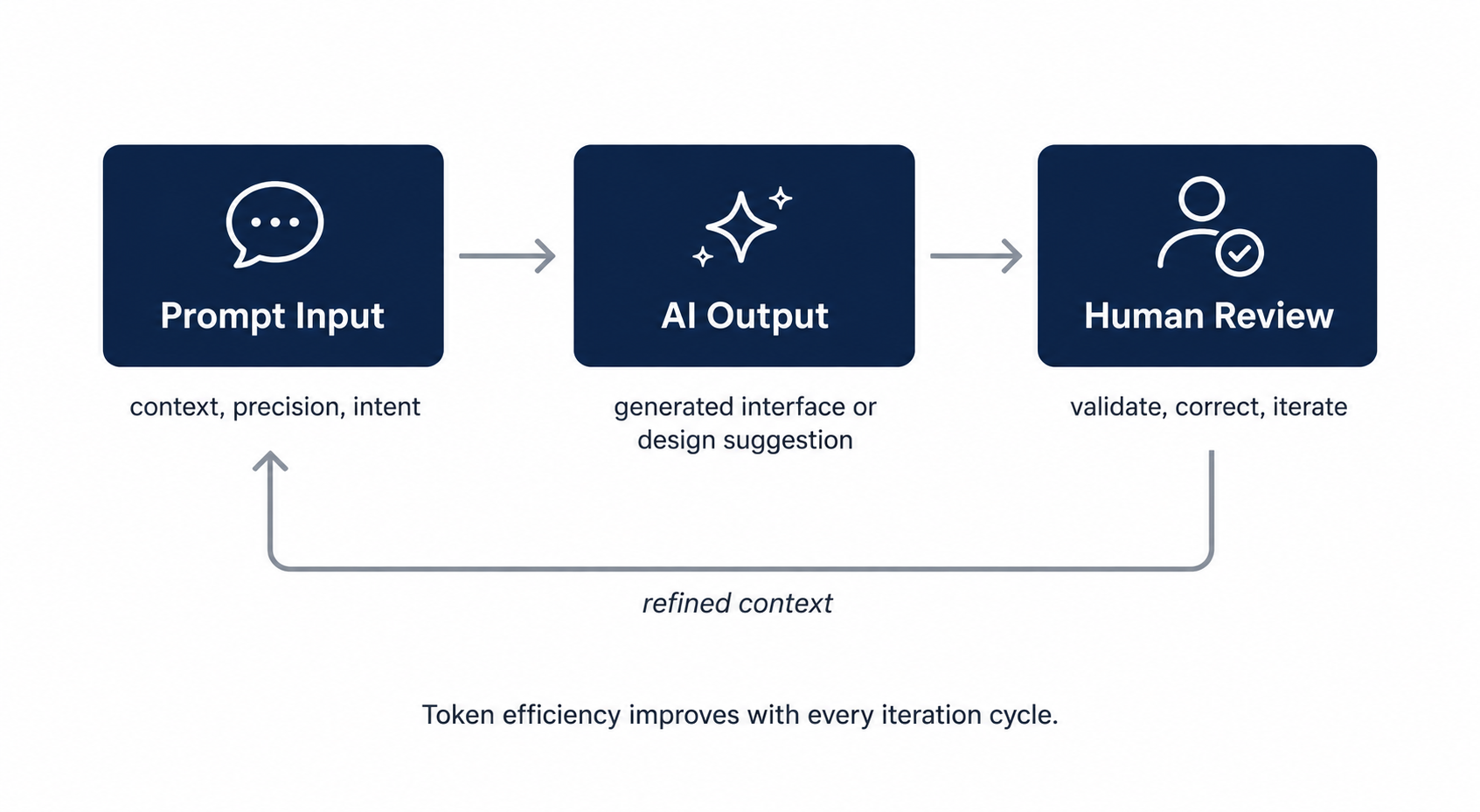
An important realization for any founder using AI tools is not to tie the concept of fast adoption of these tools with only beneficial outcomes, because AI tools are 100% committing mistakes, even if it appears as if they don't. Your ’control’ over them can’t prevent that, for the time being, AI will hallucinate. So that’s why one of your main focuses should be on the quality of the prompts you create every single time. You need to absolutely master the art of creating context-rich and experience-validated prompts. That means there is a lot of work even before starting to write a prompt; think of this like a fishing trip. You should never ’wing it’; it’s like using prime bait, you are taking a calculated risk (context, time, precision, etc.) to optimize its use.
Human-in-the-loop
Optimizing the use of prompts is, without a doubt, the go-to strategy when using AI tools; this type of development only works with a human, and preferably an expert, checking every advancement. Human in the loop is an architecture decision; you are designing through AI guardrails from the beginning, which is also the most responsible way to do it. With the right team using AI tools, human oversight provides an engineering perspective and system architecture from day one. These guardrails ensure constructive judgment towards AI errors and provide the needed context, ethics, and integrity.
If you follow prompting with intention and apply a ’human-in-the-loop’ scope, you have higher chances of limiting token overuse. This issue must be addressed over time; if not, you are facing a slow development cycle and an expensive flow that can translate to the product never reaching a GTM phase.
AI Tools Get You To The Next Level
If you are a developer or designer, there are high chances your workflow has evolved. AI tools have created new ways to work, and being good at coding is not enough to stand out. You need to know how to direct, monitor, and get consistent value out of AI tools. A different but necessary set of skills to acquire.
We can say you are now “teaching” your tool of preference to consistently provide value in each request. You are the one that takes the decisions and creates the prompts and the one who checks quality and is always monitoring results. Having the chance to optimize your workflow is a unique opportunity that requires even more judgment than before.
Case Study: Netflix Personalized Artwork Recommendation
Improving UX in products through AI tools is still something done subtly and with a lot of data to back it up. Netflix is one of those companies that knows how to use AI in an effective manner; hence, they've been using machine learning to recommend users what series or movie to watch next. Given the success this strategy created, they decided to do something similar to determine what visual content titles should appear on the users' screens to drive more engagement and satisfaction. These visual assets could vary on themes like romance, action, drama, basically anything that could potentially create an emotional impact.
Netflix took a trained large language model called the Llama 3.1 8B model and analyzed 100k user-title pairs of information points on 5k quality to understand what type of visuals users preferred or had more impact on their decision-making. With clear data and an already used LLM, they could craft a personalized strategy for their users and achieve a 3–5% improvement in user satisfaction.
Improve, Secure, and Iterate
No matter the scope of a project, if you want to see actual UX improvements coming directly from AI tools, there has to be a validated process built on context, expertise, and constant iteration. This ’era’ will separate those who seek AI development looking for shortcuts and those who integrate it strategically, taking performance, security, and vision into account.
Related Questions & Answers
Should I replace my UX designer with an AI tool?
For my first AI feature, is a chatbot a good idea?
If I'm a non-technical founder, how do I apply the human in the loop concept?
Keith Shields is the CEO and Co-founder of Designli, a leading software and web development company. Keith is passionate about creating impactful digital experiences for non-technical founders. He co-founded Applits, a startup recognized as the "Coolest College Startup of 2014" by Inc.com, and has since led hundreds of successful projects at Designli. As a serial entrepreneur, Keith is committed to helping non-technical founders launch transformative digital products through Designli’s proprietary SolutionLab process.
Discover more TechBehemoths Insights
Learn practical tips and insights about IT Companies, how to find the right company for your projects.
Read the latest news about Market Trends and fresh Interviews.